
1 year of Plus free · 998 left

Take back control of your money.

What you have, what you owe, what’s about to go out and what you really have left: your whole situation on one screen. So you can plan calmly and start putting money aside.

  • No bank connection needed
  • No ads, data never sold
  • 6 languages, 19 currencies
Your envelopes
Free to spend$771.56

No judgment

Nobody taught us how to manage money. You can start here.

Paying rent, groceries and bills, paying off a loan, thinking about tomorrow: nobody teaches us how to hold it all together. It’s not about being good or bad with money. It’s about visibility and a few landmarks, and that can be learned, at your own pace.

46%
of U.S. adults say they have set aside enough to cover three months of living expenses.FINRA Foundation, National Financial Capability Study, 2024 wave (new tab)

The big picture

Your money is everywhere. Bring it all together.

Your paycheck lands in one account, benefits in another. There’s a loan, some bills, maybe money borrowed from family. In My Little Budget, you bring it all together in a few minutes, without connecting your bank.

At the checkout, a mother smiles at her son, proudly carrying the shopping bag; she holds her phone. Fictional characters, AI-generated image.
  • What you have

    Your accounts, your savings. Everything that’s yours, in one place.

  • What you owe

    Loans, credit cards, even money borrowed from family or friends. Nothing left to keep in your head.

  • What’s going out

    Rent, bills, scheduled payments, each on its date. You see them coming before they hit.

  • What you really have left

    The number that matters, once everything is set aside. And what you really own: your accounts minus what you owe.

The envelope system

Our parents’ system, without the cash.

Many of our parents budgeted with envelopes. On payday: one for rent, one for groceries, one for the electric bill, one to put aside. When the grocery envelope was empty, you knew it without doing any math.

My Little Budget brings that idea back. You give each envelope an amount, every expense goes into its own, and you see at a glance what’s left, what you saved or what ran over. No cash, no spreadsheet, and nothing gets blocked: you’re the one who decides.

Groceries$374 / $450
Energy$50 / $50
Going out$96 / $80 (over budget)

What your bank doesn’t show you

Your balance doesn’t tell the whole story.

Your balance shows what you have today, not what’s going out tomorrow. Payday comes, then rent, scheduled payments, groceries… and the account sometimes dips below zero before the next payday. It’s not your fault: you just can’t see it coming.

  • My Little Budget sets aside what’s already committed until your next payday.
  • You see what you can really spend, and how much per day.
  • If a dip below zero is coming, you know before, not after.
$0paydaypaydaybelow zero
Without visibility, the balance rises on payday, then dips again. The app shows you that dip ahead of time.

Try it without an account

How much do you really have left? Find out in 10 seconds.

Nothing is sent or saved: the calculation happens on your phone.

Free to spend$771.00that’s $64.25 a day until paydayThis number changes with every expense: the app keeps it up to date for you.Track it every day, for free

Guided tour

Your budget, at the pace of your paycheck.

Here is the app as it is, with sample data.

1 · Free to spend

One number: what you can spend without going into the red.

The money in your accounts, minus everything already committed until your next payday. Right below, the dated list of what’s going out: rent, phone plan, repayments. One tap when it’s paid.
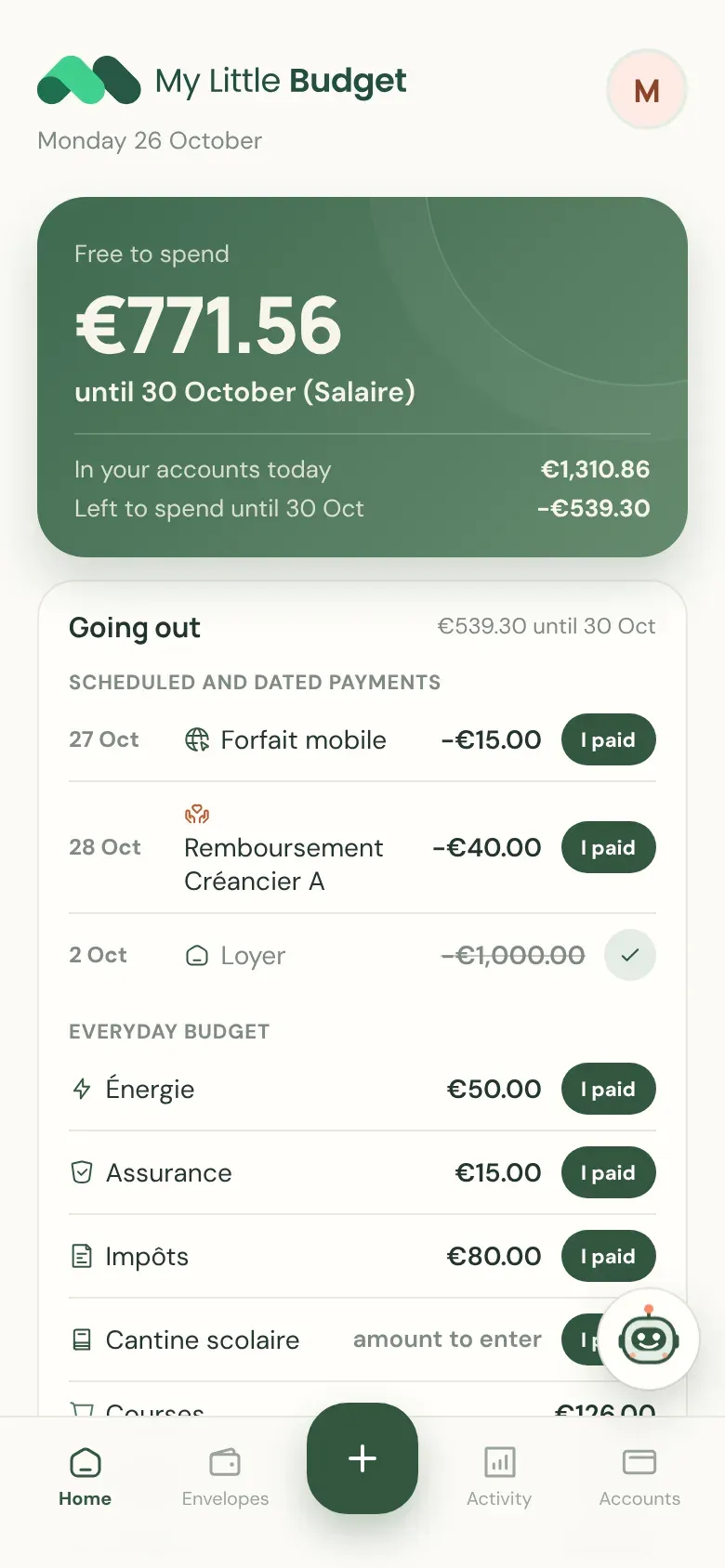
Home: free to spend and the list of what’s going out

2 · Your envelopes

Planned, spent, left. From one paycheck to the next, not by the calendar.

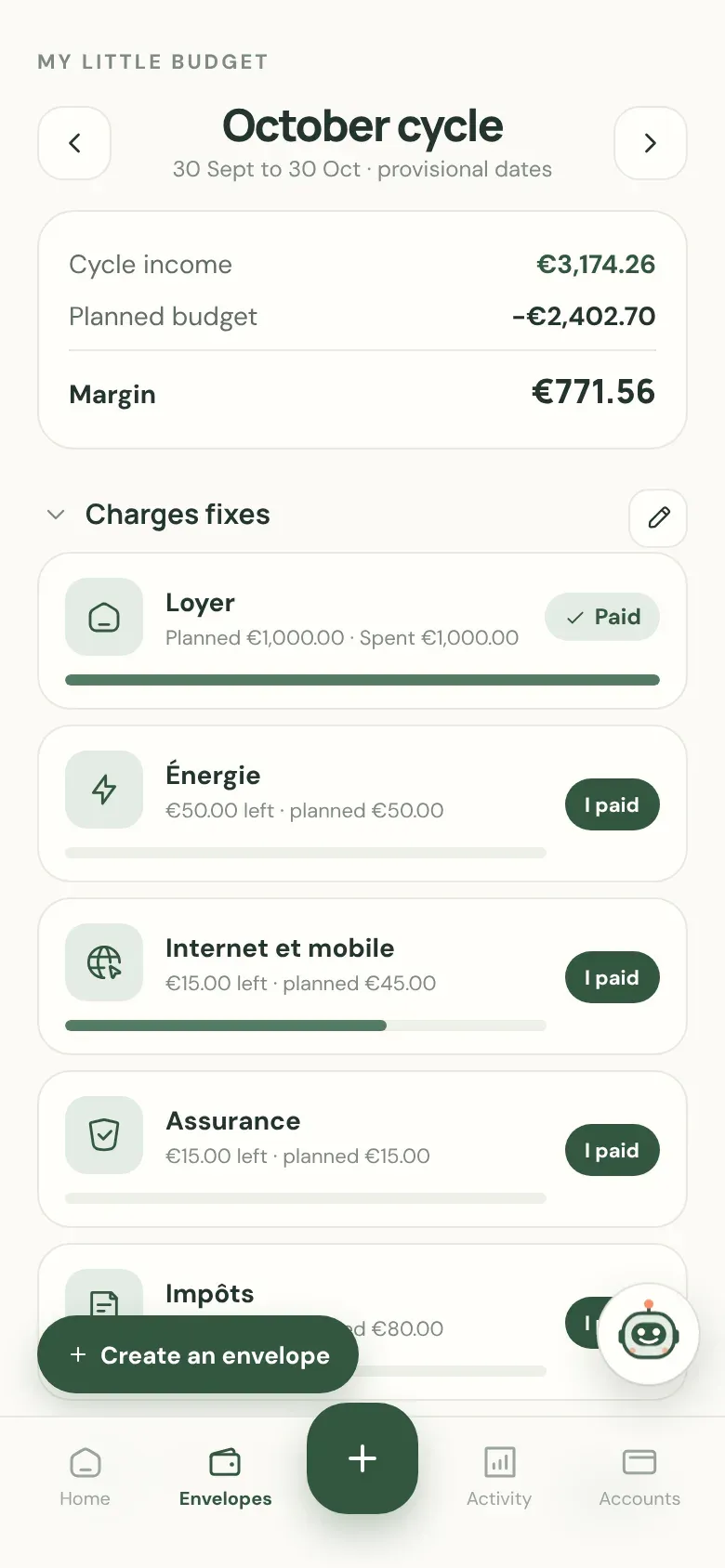
Fixed costs, everyday spending, debts, savings: each envelope shows what’s left. The paycheck you get at the end of October pays for November, and the app knows it.

October envelopes: income, planned budget, margin, fixed costs

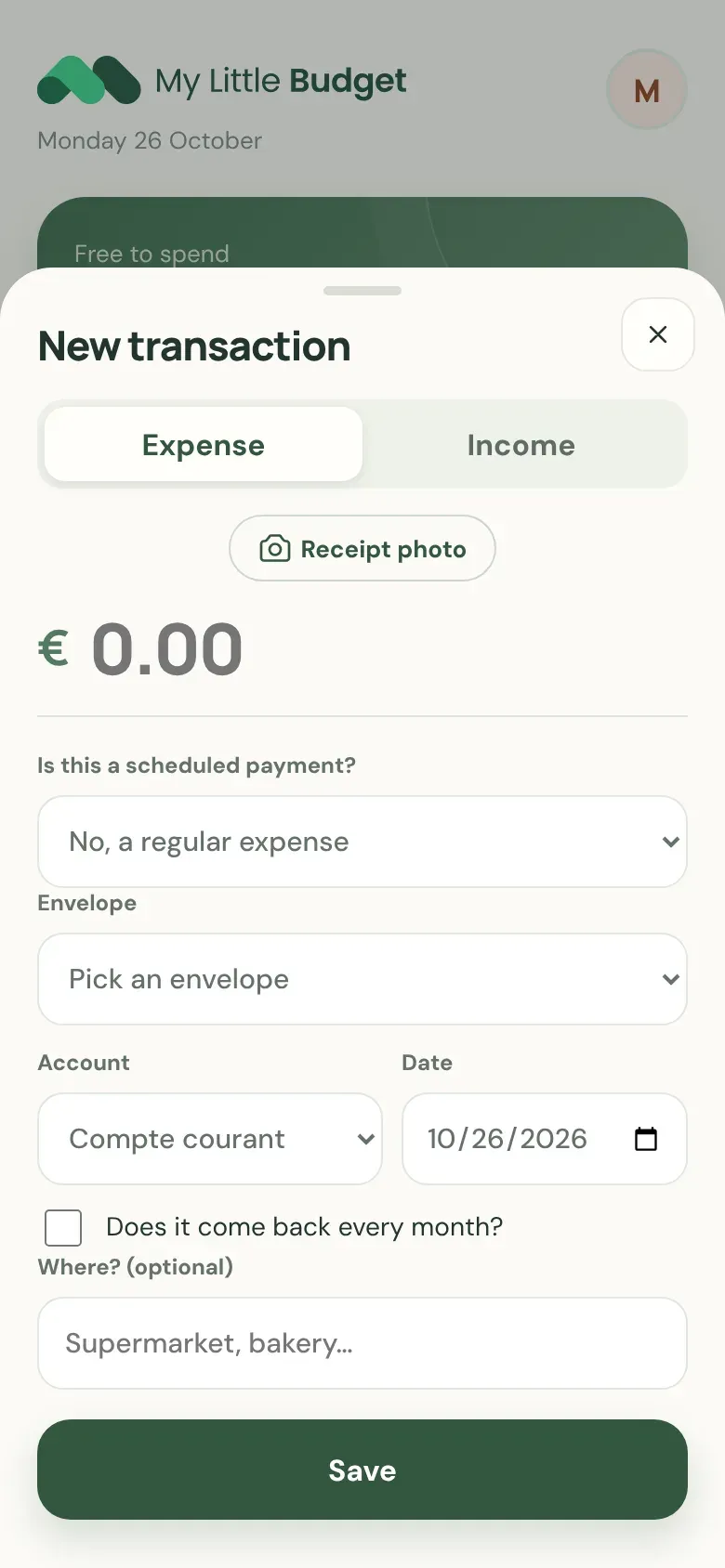
3 · Add

An expense in a few seconds. Or from a photo of the receipt.

Type the amount, pick the envelope, done. With a photo of the receipt, the app suggests the merchant, the date and the total: you confirm, nothing is saved without you, and the photo isn’t kept.

New transaction: amount, envelope, account, date, receipt photo button

4 · Understand

Where the money goes, and how fast.

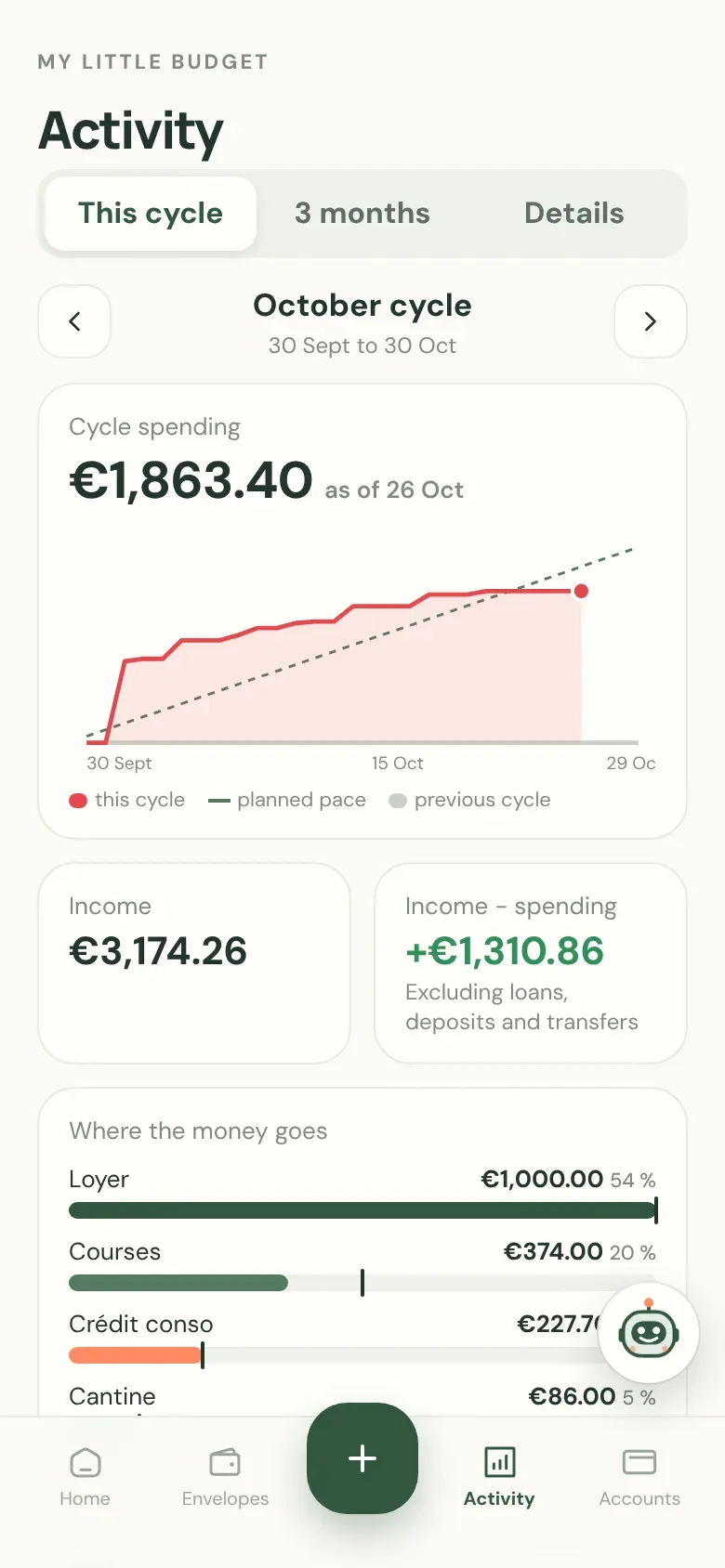
Your spending since payday compared with your planned pace, each envelope’s share, and a three-month projection if you stick to your budget.

Activity: spending curve since payday and breakdown by envelope

5 · Everything you have, everything you owe

Accounts, savings, loans, debts with family and friends: one honest view.

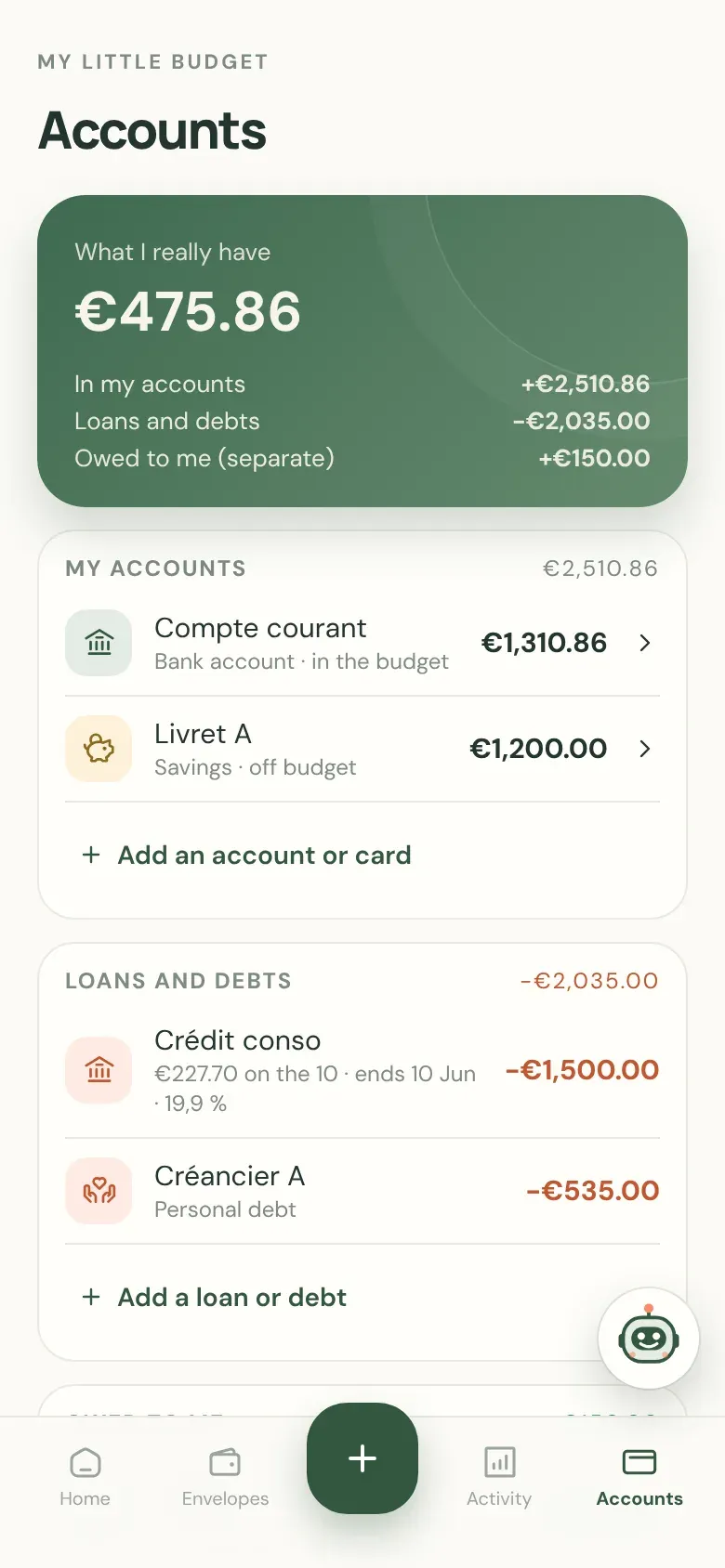
“What I really have” = your accounts minus your loans and debts. What you’re owed is kept separate. And checking against your bank keeps your balance right, without ever rewriting your history.

Accounts: what I really have, accounts, loans and debts

6 · Your companion

Ask your question: it reads your budget and answers.

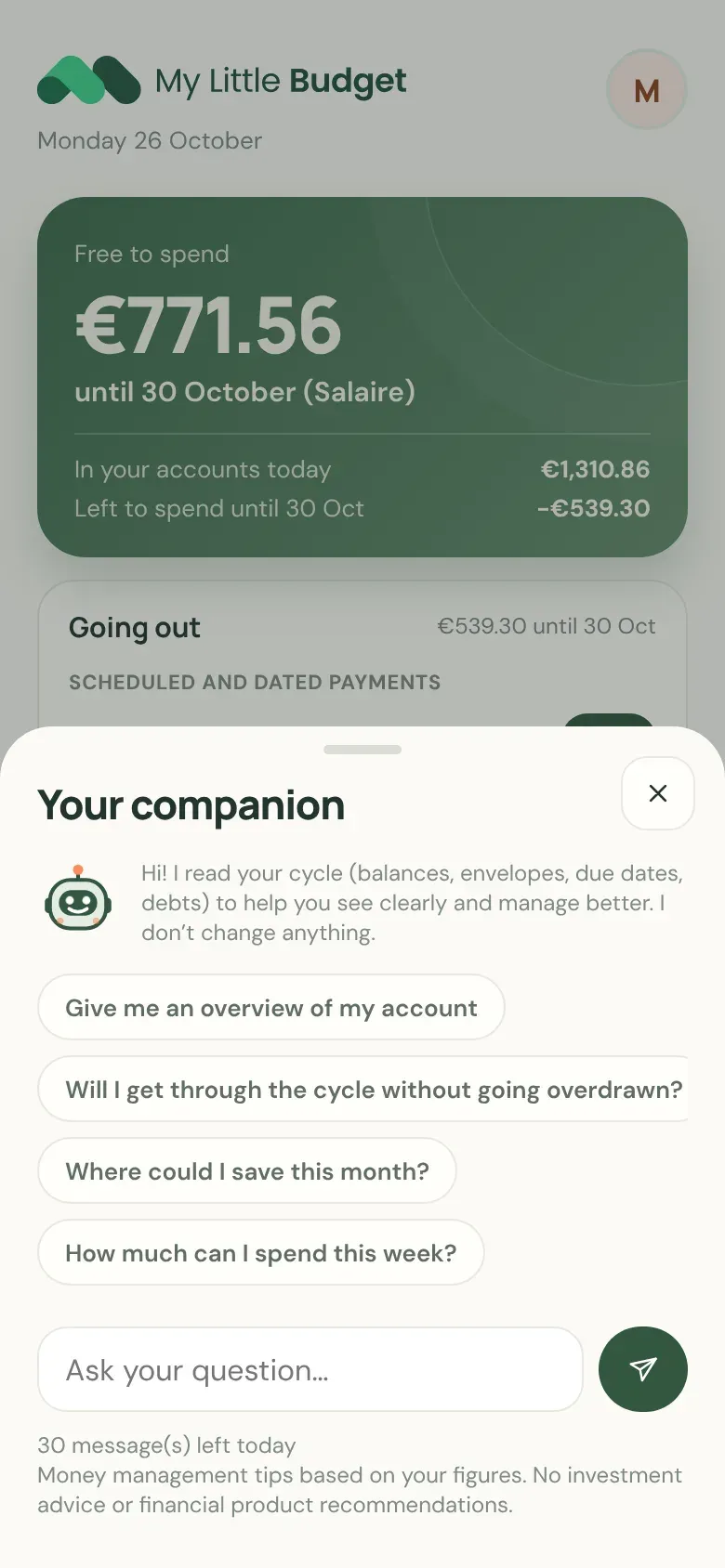
“Will I make it to payday without going overdrawn?”, “Where could I save this month?”. It suggests ideas based on your figures, kindly; you’re the one who decides.

An AI assistant, never a human. No investment advice, no recommendation of loans, banks or financial products. Conversations are not kept.

Your companion: suggested questions and a field to ask your own

Moving forward

Plan what’s next, calmly.

The next 3 months

See where you’re heading if you stick to your budget: your upcoming balance and each month’s margin.

Pay off debts without missing a thing

Every payment on its date, and the amount left to pay going down with each one.

Put money aside, even a little

Your savings kept apart, a goal, and each month’s margin to move forward.

Get started

No need to be an expert.

You start with what you know today. The rest fills in little by little, at your own pace.

  1. Sign in

    With Google or a link sent by email, no password. Your first name, your country, your currency, and you’re set.

  2. Tell us where you stand

    Today’s balance, your payday, your main scheduled payments.

  3. See what you really have left

    The number that matters, and what’s going out before your next payday.

Why not a spreadsheet, or your bank’s app?

Comparison of My Little Budget with a spreadsheet and your bank’s app
My Little BudgetA spreadsheetYour bank’s app
What’s going out before paydayYes, with datesIf you keep it up to dateDepends on the bank
Budget from one paycheck to the nextYesBuild it yourselfRarely
Overdraft, loans, debts with family and friendsTracked togetherBy handIts own products
Several banks in one placeYesYesNo
On your phoneYesNot very practicalYes
Sells you productsNeverNoThat’s its business

Welcome offer

1 year of Plus free for the first 1,000 accounts.

The app is free for everyone, with no time limit. Plus: more companion messages and receipt photos every day, longer forecasts. No credit card required.

998free Plus accounts left

Spots left as of the site’s last update.

Your data

No bank connection

You enter your transactions, or snap the receipt. No bank login is ever requested.

Your data stays yours

No ads, no reselling. Every account is isolated from the others.

Leave whenever you want

Spreadsheet export in one click, account deletion from the app.

How we make money

With the Plus subscription, and only that. That’s what lets us sell you nothing else.

Frequently asked questions

Is it really free?

Yes: the app is free, with everything essential (accounts, envelopes, free to spend, debts, forecast, export). The first 1,000 accounts also get one year of Plus, with no credit card.

I’m not good with money. Is this for me?

That’s exactly what it’s for. You start with your balance and your payday; the app helps you see the rest, and the companion answers your questions, without judgment.

Do I have to connect my bank account?

No. You enter your transactions, or take a photo of the receipt. The app never asks for your bank login.

What happens to my data?

It’s only used to run the app. No ads, no reselling. You can export everything or delete your account whenever you want.

Does the companion give me investment advice?

No. It helps you manage your budget (an envelope to adjust, an expense to push back, a debt to prioritize). Never investment advice or financial product recommendations.

Which languages and currencies?

The app is available in French, English, Spanish, Portuguese (Brazil), German and Italian, and supports 19 currencies, including the euro, the CFA franc and several Latin American currencies.

Start with where you are today.

You don’t need a perfect budget to take back control.

998 accounts left with 1 year of Plus free.

Create my free space